Apple Intelligence
On devices that support Apple Intelligence, Chatrix uses Apple Intelligence on the device to make sense of your chats:
| Feature | What it does |
|---|---|
| Part summaries | Writes a title, summary, topics and tone for each part of a conversation; part dividers in the conversation show a one-line summary. |
| Recaps | Sums up a conversation by day, week, month or year. |
| Tone & Topics | Counts the most talked-about topics and the tone of the messages from part summaries. |
| Bond Story | The phases you've gone through together in a one-on-one conversation. |
| A line for the year in Year in Review | Writes a line for the year, which you can also put on the share card. |
| Ask Chatrix | Ask about your own chats in a sentence, and get answers with sources. |
- Without Apple Intelligence, everything else, such as importing, reading, search and the statistics in Insights, works as usual.
- Content made by Apple Intelligence may contain mistakes, such as attributing something to the wrong person, and the screen always notes that it may contain mistakes. For anything important, select the sources to go back to the original messages and check.
Requirements
- An iPhone, iPad or Mac that supports Apple Intelligence.
- Apple Intelligence turned on: Turn it on in the Settings app on iPhone or iPad, or in System Settings on Mac, and wait for the model to finish downloading.
- Language: Depends on the languages Apple Intelligence supports. If it doesn't support Chatrix's language yet, content is written in English. See "Languages" below.
When Apple Intelligence can't be used, the reason appears at the top of pages such as "Summaries" and "Recaps", and in "Settings" › "Apple Intelligence":
| Situation | Message on the screen | What happens |
|---|---|---|
| This device doesn't support it | "This device doesn't support Apple Intelligence. Everything else in Chatrix works as usual." | There's no "Summaries" in conversations, Insights doesn't list "Tone & Topics", "Recaps" or "Bond Story", you can't write a line for the year in Year in Review, and Ask Chatrix is in Search Mode. |
| It isn't turned on | "Apple Intelligence Is Off": "To make summaries, turn on Apple Intelligence in Settings." (on Mac, it asks you to turn it on in System Settings) | You can view summaries and recaps that were already made, but you can't make new ones; Ask Chatrix is in Search Mode. |
| The model is still downloading | "Apple Intelligence Is Getting Ready": "The model is still downloading. Try again later." | Same as above. |
| It's temporarily unavailable | "Apple Intelligence Isn't Available": "Apple Intelligence can't be used right now. Try again later." | Same as above. |
| Chatrix's language isn't supported | "Summaries Are in English": "Apple Intelligence doesn't support your language yet, so summaries are written in English." | Everything works as usual, but content is written in English. |
You can also check the current status in "Settings" › "Apple Intelligence". See "Settings" below.
Languages
The language that summaries, recaps, topics, Bond Story, the year's line and Ask Chatrix answers are written in depends on the languages Apple Intelligence supports:
- If it supports Chatrix's language: Content is written in Chatrix's language, even if the conversation is in another language.
- If it doesn't yet: Content is written in English. In our testing so far, Thai, Indonesian, Malay and Filipino aren't supported yet.
- "Summaries Are in English" appears at the top of the "Summaries", "Recaps", "Tone & Topics" and "Bond Story" pages: "Apple Intelligence doesn't support your language yet, so summaries are written in English." This note also appears below the status in "Settings" › "Apple Intelligence".
- Ask Chatrix answers are in English too, but Ask Chatrix doesn't show this note.
- Chatrix checks with the system every time whether Apple Intelligence supports your language. When Apple adds your language later, Chatrix automatically starts writing in it.
- Summaries are saved separately for each language: after you change Chatrix's language, or after Apple Intelligence starts supporting your language, summaries need to be made again in the new language (this happens automatically when background summarizing is on). If you switch back to the original language, the original summaries appear again.
Part summaries
Chatrix divides conversations into parts by time: when more than 30 minutes pass without a message, a new part begins. Summaries are made only for parts with at least 5 messages, and each part's summary has:
- A title (one sentence)
- A summary of one to three sentences
- Up to 4 topics
- A tone: one of "Casual", "Warm", "Excited", "Calm", "Formal", "Tense", "Sad" and "Mixed", describing the tone of that part of the conversation as a whole, not judging anyone.
Making summaries
- Open a conversation and select "Summaries" (✨) in the top-right corner to open the "Summaries" page. This button appears only on devices that support Apple Intelligence.
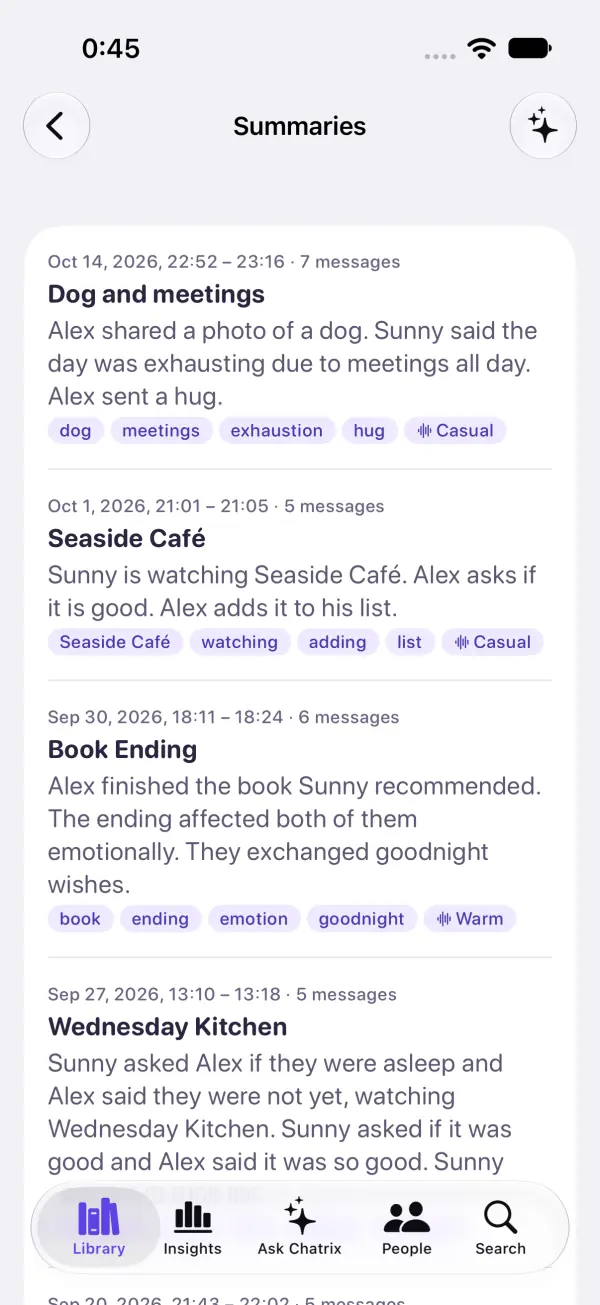
- The "Summaries" page lists the conversation's parts from newest to oldest, each with its date, time and number of messages; parts that already have a summary also show the title, summary, topics and tone.
- Make summaries:
- One part at a time: Select "Summarize" below a part.
- All at once: Select "Summarize All" in the top-right corner to summarize the rest of the conversation's parts one after another. "Summarizing…" and the progress ("… of …") appear at the top. Select "Stop" to stop; summaries that are already done are kept.
- Select a part to go back to the conversation, scrolled to that part's first message.
- While summaries are being made, iPhone and iPad don't lock the screen automatically; leaving the "Summaries" page stops it.
- If a part can't be summarized, the reason appears on that part, for example "This part is too long to summarize." See "Apple Intelligence messages". If Apple Intelligence is busy or temporarily interrupted, Chatrix first tries again automatically a few times. If it still doesn't work, summarizing all at once stops; summaries that are already done are kept, and selecting it again continues from the parts that haven't been summarized yet. If making a summary fails, the button changes to "Try Again". See "Making summaries or recaps is interrupted".
- "Made by Apple Intelligence on this device. Summaries can contain mistakes." appears at the bottom of the page. If there are parts with fewer than 5 messages, it also notes "Parts of a conversation with fewer than 5 messages aren't summarized."
- If the conversation has no parts with 5 or more messages, "Nothing to Summarize" appears.
- Summaries are saved and aren't made again as long as a part's content doesn't change. If importing again adds messages to a part, that part needs to be summarized again.
- With background summarizing on, many parts already have summaries before you open the conversation.
- When Apple Intelligence can't be used (for example, it isn't turned on), the reason appears at the top of the page, and you can only view summaries that were already made.
One-line summaries while reading
For parts that already have a summary, a part divider appears in the conversation before the part's first message: the time on top, and below it ✨ and the title of that part's summary, like a one-line summary.
- The conversation screen only shows summaries that have already been made; it doesn't make them. Parts without a summary don't show a divider.
- When you go back after making summaries on the "Summaries" page, the new part dividers appear right away.
Background summarizing
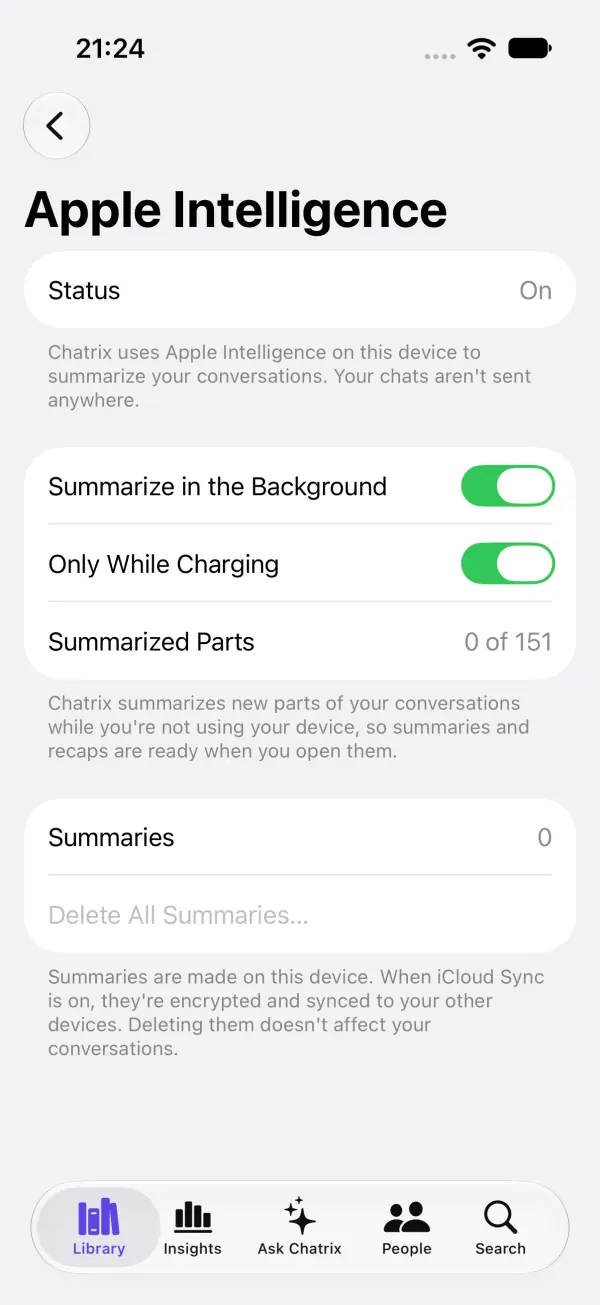
"Chatrix summarizes new parts of your conversations while you're not using your device, so summaries and recaps are ready when you open them." Go to "Settings" › "Apple Intelligence":
- "Summarize in the Background": on by default. Makes summaries for parts in all conversations that don't have one yet, newest parts first.
- "Only While Charging": on by default, so summarizing happens only while the device is connected to power. It can't be changed while "Summarize in the Background" is off.
- "Summarized Parts": how many of the parts that can be summarized in all conversations have been processed ("… of …").
When summarizing happens:
-
iPhone and iPad: After you leave Chatrix, the system schedules it for when the device is idle, and the system decides the actual time. When "Only While Charging" is on, it happens only while the device is connected to power. No network connection is needed.
-
Mac: While Chatrix is open, it summarizes a batch about every 30 minutes. When "Only While Charging" is on, it's postponed while a Mac laptop is running on battery.
-
When you make summaries or recaps, or use Ask Chatrix, background summarizing gives way first.
-
When Apple Intelligence is busy or can't be used, background summarizing pauses and continues later.
-
Parts that couldn't be summarized (for example, because the content was blocked by safety guardrails) aren't tried again by background summarizing; you can still summarize them manually on the "Summaries" page.
-
If this device doesn't support Apple Intelligence, this section doesn't appear in Settings.
Settings
Go to "Settings" › "Apple Intelligence" (for how to open Settings on each device, see "Settings and About"). The right side of this row in "Settings" shows the current status: "On", "Off", "Getting Ready" or "Not Available".
| Item | What it does |
|---|---|
| "Status" | The same as that row in "Settings". Below it: "Chatrix uses Apple Intelligence on this device to summarize your conversations. Your chats aren't sent anywhere." When Apple Intelligence can't be used, the reason appears instead. See "Requirements". |
| "Summarize in the Background" and "Only While Charging" | See "Background summarizing" above. |
| "Summarized Parts" | The progress of background summarizing. |
| "Summaries" | The number of summaries made, including recaps, Bond Story and the year's line. |
| "Delete All Summaries…" | See "Deleting all summaries" below. |
Deleting all summaries
- Go to "Settings" › "Apple Intelligence" and select "Delete All Summaries…". It can't be selected when there aren't any summaries yet.
- On the "Delete all summaries?" page, select "Delete All Summaries". To cancel, just go back to the previous page. The note on the page depends on iCloud sync:
- When iCloud sync is on: "Summaries and recaps are deleted from all your devices. Your conversations aren't affected, and you can summarize them again anytime." They're also deleted from iCloud and your other devices.
- When it's off: "Summaries and recaps are deleted from this device. Your conversations aren't affected, and you can summarize them again anytime."
- Part summaries, recaps, Bond Story and the year's line are deleted. Ask Chatrix history isn't affected; clear the history separately.
- Devices with "Summarize in the Background" on will make summaries again later. If you don't want them made again, first turn off "Summarize in the Background" on each device, then delete.
- If deleting fails, an error code appears on the confirmation page.
iCloud sync
"Summaries are made on this device. When iCloud Sync is on, they're encrypted and synced to your other devices. Deleting them doesn't affect your conversations."
- When iCloud sync is on, summaries and recaps (including Bond Story and the year's line) are encrypted on the device first and then synced to your other devices, just like your chats. For example, summaries made on your Mac don't need to be made again on your iPhone and iPad.
- Summaries are saved by language: synced summaries are used only on devices where Chatrix is set to the same language.
- If the same part was summarized on two devices, the copy in iCloud is the one that's used.
- When you delete a conversation or delete all summaries, they're also deleted from iCloud and your other devices.
- Ask Chatrix history isn't synced through iCloud. See "History".
- Backups and device-to-device transfer include the summaries and recaps already made, as well as Ask Chatrix history.
Privacy
- Processed on this device: Summaries, recaps, Tone & Topics, Bond Story, the year's line and Ask Chatrix are all handled by Apple Intelligence on this device, and your chats aren't sent anywhere.
- Stored with your chats: What's made is stored in your chat library. Only when iCloud sync is on is it encrypted and stored in your own iCloud.
- No guessing about sensitive traits: Chatrix asks Apple Intelligence to write only from your messages, without guessing anyone's health, sexual orientation, religion, political views or ethnicity, and without judging anyone. The tone only describes the conversation, not anyone's state.
- The share card checks names again: Chatrix asks for the year's line to leave out people's names, and when the share card hides names, it checks again. See "Share card".